In this article, we explain what to do when a Timeout occurs. One of our recommendations is to use the CheckBookingStatus method to verify whether the reservation was successfully confirmed. Below, you can find an explanation of how to use this method.
Use the following endpoint:
https://ws-[clientIdentification].cangooroo.net/API/REST/Hotel.svc/CheckBookingStatus
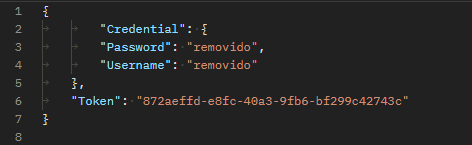
If your reservation was created from a search by destination, make the request using the same username, password, and token that were used to create the reservation:
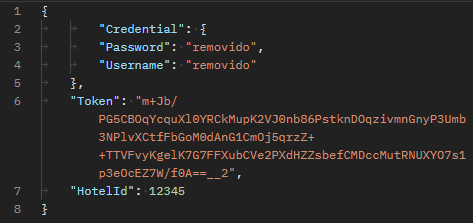
If your reservation was created from a search by hotelId, make the request using the same username, password, hotelId, and token that were used to create the reservation:
If the request matches an existing reservation, the response will be similar to the following: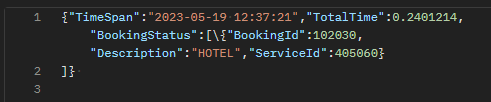
If you receive the reservation ID and service ID, you should use the ClientBackoffice API to retrieve the reservation details and verify its actual status.
If you receive an error, try calling the doBooking method using the same token to complete the reservation.
You can find the complete list of possible reservation statuses in our status list.
Was this article helpful?
That’s Great!
Thank you for your feedback
Sorry! We couldn't be helpful
Thank you for your feedback
Feedback sent
We appreciate your effort and will try to fix the article