5. Registering a Hotel: Cancellation Policies
Tags: Extranet
Here you can register the hotel’s cancellation conditions. It is possible to set up multiple policies for the same period or for different periods. For example, you can define a general policy and also specific cancellation policies.
Keep in mind that the system will always prioritize the most restrictive policy.
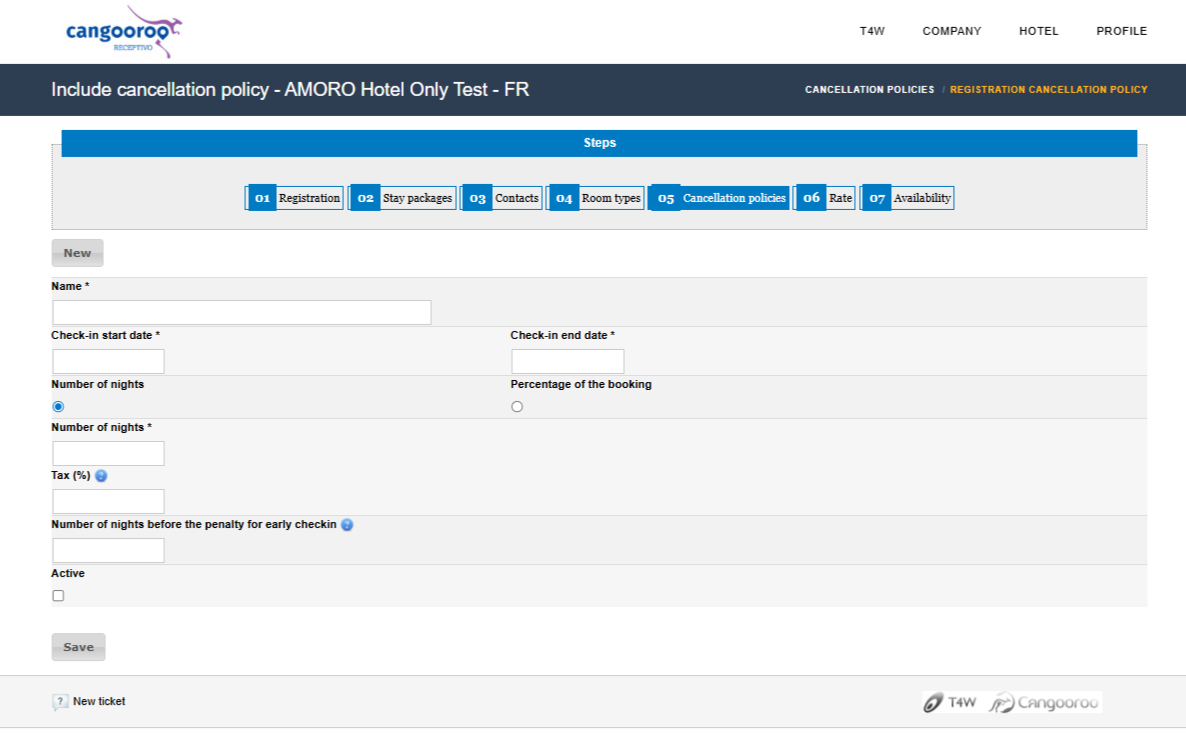
Name: Give a name to the cancellation policy.
Check-in Start Date
Check-in End Date
This policy can be defined by:
Number of nights: If you select the “Number of nights” option, you must define the number of nights to which the cancellation policy applies.
or
Reservation Percentage: If you select the “Reservation Percentage” option, you must define the percentage to which the cancellation policy applies.
Tax
Number of nights before check-in for penalty to start: Indicate the number of days.
Active: It is important to select this field so the policy is activated; if left unchecked, the policy will be disabled.
Reset Priority: When selecting this option, this cancellation policy will be set as priority. If new policies are later created, this priority is automatically removed.
Was this article helpful to you?
Was this article helpful?
That’s Great!
Thank you for your feedback
Sorry! We couldn't be helpful
Thank you for your feedback
Feedback sent
We appreciate your effort and will try to fix the article