It is now possible to configure a specific commission percentage for each supplier directly from the agency's Commission and Markup settings.
This new feature allows agencies to apply different commission rates depending on the supplier, while retaining the agency's general commission as the default whenever no supplier-specific commission is configured.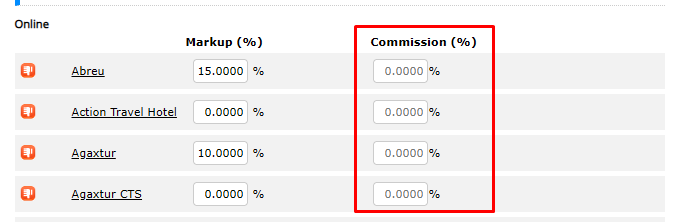
How it works
In the agency's Commission and Markup settings, a new commission field has been added next to the markup field for each supplier and service.
Both markup and commission values are saved together using the same save button.
The commission field accepts percentages ranging from 0% to 100%.
Supplier-specific commission
Once a commission is configured for a supplier, that percentage is applied to reservations made through that supplier for the agency.
For example, if a commission of 20% is configured for a particular supplier, the system will apply this percentage to reservations made through that supplier.
The configuration is specific to each supplier and service, allowing agencies to define different commission rates according to their needs.
Empty commission field
If the commission field is left empty, no changes are made to the existing configuration.
In this case, the agency's general commission continues to apply.
This means agencies can configure specific commission rates only for suppliers that require different percentages, without affecting the others.
Was this article helpful?
That’s Great!
Thank you for your feedback
Sorry! We couldn't be helpful
Thank you for your feedback
Feedback sent
We appreciate your effort and will try to fix the article